Player housing in a browser MMORPG: Hero Chambers, trophies and visitors
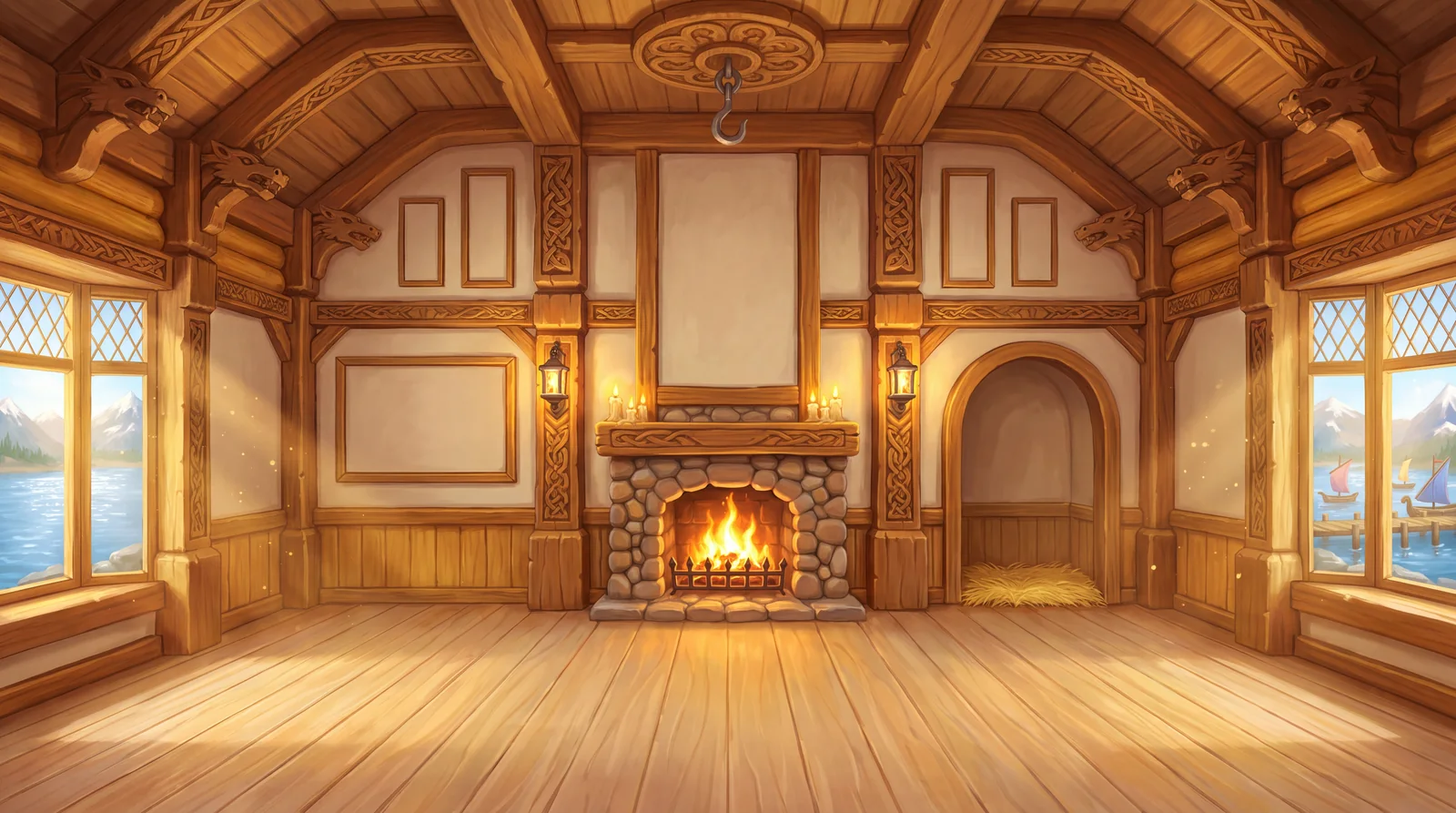
Hero Chambers in Zarhold: player housing in a browser MMORPG. Your armor on a mannequin, weapons on a rack, your own layout and friends who visit.
Player housing is one of those MMORPG features people love more than they admit. It isn’t another “get stronger” button — it’s the place that shows who your hero has become: what they fight with, what they can make, what they’ve been through. In Zarhold, a card MMORPG you play in your browser, every hero now has such a place — Hero Chambers, a room of their own in the Great Hall. Here’s how it works, what’s in it from your very first visit, how to rearrange the furniture and how to drop in on a friend. And the key point up front: the Chambers give no power and don’t affect combat — they’re pure enjoyment.
What player housing in an MMORPG is
Player housing is your personal space in an online world: a house, a room or an estate that belongs to you alone. It usually does three jobs:
- a showcase — for trophies, rare items and proof of your victories;
- a cosy corner — somewhere you want to arrange your own way;
- a meeting place — somewhere to invite your friends.
In many games you have to build your home first: gather materials, craft furniture, place every little thing by hand. Zarhold takes a different route: the room furnishes itself from what your hero already has. You can rearrange it as much as you like, but it’s never empty.
Hero Chambers at a glance
- A room for every hero. However many heroes you have on your account, each has a room and a story of its own.
- Open to everyone at any level. You don’t need a particular hero level.
- The basics are free. Two room styles and eight furnishings are there for every hero from the first visit.
- A living room. Change your armor, learn a craft, pick up a new weapon — the Chambers follow your hero.
- Looks only. No stats, no cards, no loot — the Chambers have no effect on combat at all.
How to open your Chambers
There are two ways in:
- The button on your hero’s portrait — a round button on the portrait in your hero sheet. It works at any level.
- Great Hall → Hero Chambers — a tile in the capital’s main quarter. The city itself opens to level 60 heroes; more about it in the knowledge base.
The room opens over the game and closes just as quickly, so you can pop in between fights.
A room that furnishes itself
From your first visit, eight pieces stand in your Chambers. All of them are free, and all of them are “live” — they show what your hero has right now:
- Fireside Armchair — the host’s seat, and the guest’s when friends come over.
- Weapon Rack — what your hero is wielding, plus their legendary weapons (up to five). Pick up a weapon and it goes on the rack.
- Craftsman’s Shelf — tools of the crafts your hero knows. Learn a new craft and the shelf fills up.
- Season Pennants — your three best arena seasons where your hero finished in the top hundred. How to get there is covered in “Arena rating and the Hall of Fame”.
- Armor Mannequin — the chestpiece your hero is wearing right now: cloth, leather, mail or plate, glowing in its rarity colour. The mannequin’s little shelf shows your helm, shoulders and weapon. Take something off and it comes off here too.
- Window Flowers and a Songbird Cage — on the window sills of rooms that have windows. The bird is a decoration, not a pet.
- Companion’s Corner — a bed and a bowl, ready in case your hero gets a companion (more on pets below).
The room grows with your hero without a single click: level a profession and a new tool appears on the shelf, win a legendary and it’s on the rack, finish an arena season in the top hundred and a pennant goes up on the wall. Empty spots tell you honestly what’s missing — for example, “When your hero learns a craft, its tool will go on the shelf”.
Six room styles
A style changes the whole room — walls, light, windows and mood. Your furnishings move with your hero.
Free for every hero
- Simple Chambers — stone, oak and morning light. Everyone starts here.
- Lakeside Loft — honey-coloured carved timber, a candlelit hearth and windows over the Middle Lake.
Elite styles
- Royal Apartments — white marble and gold, blue velvet and stained glass, a hearth guarded by lions.
- Hall of the Mountain King — granite and bronze, amber crystals, a hearth with the king’s stone face and lava in the channels.
- Stargazer’s Tower — a study at the top of a tower: constellations on the ceiling, the moon in the windows, an astrolabe hearth.
- Highland Lodge — a hunting hall high in the mountains: timber and stone, a huge hearth, a blizzard outside.
Elite styles are sold in the Shop: you buy one once and it’s yours forever, for every hero on your account. You can try on any style first — the whole room changes, and you can save it once it’s bought.
The Lakeside Loft and the elite styles have a living background: fire in the hearth, candles, light and weather in the windows. On a weak device, with data saver on or with the system “Reduce motion” setting, the room stays calm without animation. Furniture matches the style too: in the Royal Apartments the bookcase and display are marble and gold, in the Hall of the Mountain King — granite and bronze, in the Highland Lodge — wood and fur.
The Chambers also have day and night: flip one switch and the windows go dark while the hearth and candles light the room.
Rearrange: set the room up your way
The default layout is tidy, but the room is yours. Press Rearrange:
- Pick up a piece and the spots where it fits light up on the walls and floor.
- Carry it to a highlighted spot. Wall pieces only go on walls, floor pieces only on the floor, the chandelier on its hook.
- If the spot is taken, the two pieces simply swap.
The closer a spot is to you, the larger the piece — the room has depth. On a phone you don’t even need to drag: tap a piece, then a spot. Made a mistake? There’s Undo, As saved and Default. The layout is remembered for each room style separately, so you can keep a cosy Lakeside Loft and a strict Simple Chambers, each arranged its own way.
Visiting friends
The Chambers aren’t just for you. The Visit button lists your friends and guildmates, and you can look up any other hero by name. As a guest you see the room exactly as its host arranged it: their armor on the mannequin, their weapons on the rack, their pennants.
Guests can’t touch anything, but you can Honor the host’s Chambers once a day. The host sees an “Honored: N” counter and gets a note that you honored their Chambers. It’s a small thing, but a nice one: drop by after a friend’s first top-hundred season and leave your mark.
Friends and guildmates are found through chat, parties and guilds — more in “MMORPG with friends in your browser” and “Guilds in an MMORPG”.
Furnishing sets and pets
Beyond the free pieces, you can add more to your Chambers. All of it is sold in the Shop and, like everything in Zarhold’s Shop, it’s cosmetic only: gameplay advantage isn’t for sale here.
- Trophy Wall — a board with medallions of the bosses you’ve beaten (dungeon, raid, world and zone bosses) and cups on the mantel for the arena, the Honor Circle, seasons and the Hall of Fame.
- Quarter Tapestries — four tapestries of the capital.
- Cartographer’s Study — a desk with a globe (showing a map of a land your hero has discovered, or five favourite cards from your deck fanned out — your choice) and a chest of finds that fills up with your hero’s gold, legendaries and regalia.
- Mount Stable — your hero’s mount in a stall or in the room’s alcove, with a saddle and bridle on the wall.
- Single pieces: a bookcase with recipe scrolls, a relic display, a chandelier and candelabra, a hero portrait, a guild banner, a rug and a fireplace.
Whatever you buy appears in the room on its own, for every hero on your account. Anything you don’t own, you can try on.
Living pets are sold in the Shop too. A pet your hero takes along (Collection → Pets) plays in the Chambers or sits in its favourite spot by day and sleeps in its bed at night. In combat it sits by your hero’s portrait and cheers your wins — and it doesn’t affect combat either.
Why bother with Chambers if they give no power
Because power isn’t the only reason people play MMORPGs. The Chambers are:
- your hero’s story at a glance. No need to open five windows to see who someone is: armor, weapons, crafts and arena seasons are all on display;
- a nudge towards old goals. An empty craftsman’s shelf reminds you about a second craft, an empty wall about the arena;
- a place for friends. Visiting, looking around and honoring is a small but real social ritual;
- honest. No “buy a room, get bonus damage”. The furnishings please the eye; fights are decided by your deck and your head.
Everything else that’s arrived in the game lately is in “How Zarhold keeps growing”, and the whole game is covered in the “Zarhold review”.
Hero Chambers FAQ
What level do I need for Hero Chambers?
Any level. Open your hero sheet and press the round button on the portrait. Level 60 heroes can also enter through the Great Hall in the capital.
Do the Chambers give any combat bonuses?
No. The Chambers are cosmetic only: no stats, no cards, no loot. Combat doesn’t read any of it.
What’s free in the Chambers?
Two room styles — Simple Chambers and Lakeside Loft — and eight pieces: the fireside armchair, weapon rack, craftsman’s shelf, season pennants, armor mannequin, window flowers, songbird cage and companion’s corner. Elite styles and furnishing sets are sold in the Shop.
Can I visit a friend’s Chambers?
Yes. The Visit button lists your friends and guildmates, and you can find any hero by name. Guests don’t touch anything, but once a day you can Honor the host’s Chambers.
Is my furniture layout saved?
Yes, separately for each room style. Switch to another style and it has its own layout; switch back and everything is where you left it.
Why is there no armor on my mannequin?
The mannequin shows the chestpiece your hero is wearing right now. Put on armor and it appears on the mannequin, while your helm, shoulders and weapon go on its little shelf.
The bottom line
Hero Chambers are a home in a browser MMORPG that you don’t have to build from scratch: from day one they show who your hero is, and they grow with them. Arrange the furniture your way, visit your friends, honor their rooms — while power is still forged in battle. The full reference for the Chambers is in the knowledge base. Open Zarhold and step into your room — it’s already waiting for you.
Read next
How Zarhold keeps growing: the biggest updates to a browser card MMORPG
What’s new in Zarhold: the Banner interface, the capital and Hero Chambers, Battle Chronicles, heroic raids, Heat of Battle, events, duels and guilds.

MMORPG with friends in your browser: guilds, duels, trading and chat
How to play a browser MMORPG with friends: friends and chat, parties of up to five, guilds with a bank, friendly duels, trading and mail in Zarhold.

Zarhold review: a free card MMORPG in your browser, from A to Z
A complete review of Zarhold, a free card MMORPG in your browser: card combat, 10 classes, 11 races, dungeons and raids, the arena, professions and guilds.